From the Author :
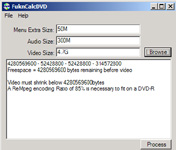
FukNCalcDVD is a calculator written in visual basic .Net to help back-up dvd movies that are dual layer that won t fit on 4.7 gig media. Once the movie is demuxed, you should have these two large:
vts_xx_audio_xxx.ac3
vts_xx_video_xxx.m2v
Browse to the directory, then the software will automatically get the audio and video file size. I set a Default value of 50 Meg reserve, so that you over estimate a little. You also can specify an amount of space for menus, extras, or an intro video you want to include. Once the Values are entered, the total free space of the disk is then returned by subtracting the # bytes used for menus, reserve, and audio. The result divided by the video size* 100 gives a the percentage ReMpeg rate to be used. Once Complete author with DVD Maestro or another prog that supports ac3 and m2v.
Input Files: DVD
Output Files: DVD
Windows 2000/Windows XP
Version 1.0.1112
- Release Date: Jan 18, 2003
- This build now gives you the option to select how many audio tracks you wish to include in your dvd backup.
You first go to browse select the number of tracks to include, then browse to each file to total up, and it will calculate space needed / left over and encoding ration for rempeg or single pass cce.


 Home
Home


 FukNCalcDVD.exe