|
A software to make backups of your DVDs to DVD or CD by transcoding, content removal or compression
From the Official Site :
With Nero Recode 2, you never have to watch bad quality movies or use multiple discs for audio or video. Now you can make backups of unprotected DVDs without any visible loss of quality AND fit a whole movie on one CD!
The solution is both clever and simple - with Nero Recode 2- you can convert DVD movies to Nero Digital using the world?s fastest MPEG-4 audio and video encoder. Remove unwanted materials such as subtitles or bonus material from any DVD (9 GB), and convert and compress to fit an entire movie with DVD video and audio quality, all onto one CD. Nero Recode 2 does it all without any loss of quality!
Got Questions?
For your Nero Recode questions, please refers to our Nero Recode Forum, and let our resident experts answer them for you.
Input Files: DVD
Output Files: DVD, H.264, MP4
Windows 95/Windows 98/Windows Me/Windows 2000/Windows XP/Windows 2003
Part of the Nero Ultra Edition bundle
Version 4.4.38.1
- Release Date: Oct 10, 2009
- Preview image is sharper when using the “Recode DVDs or main Movies to DVD'†option
View complete revision history
|

|
Rate this software:
Your Rating:
You have not voted yet!
Average: 3.38/5
Total Ratings: 21

|
|
|
| |
|
|
|
|

 Home
Home


 Purchase Nero Recode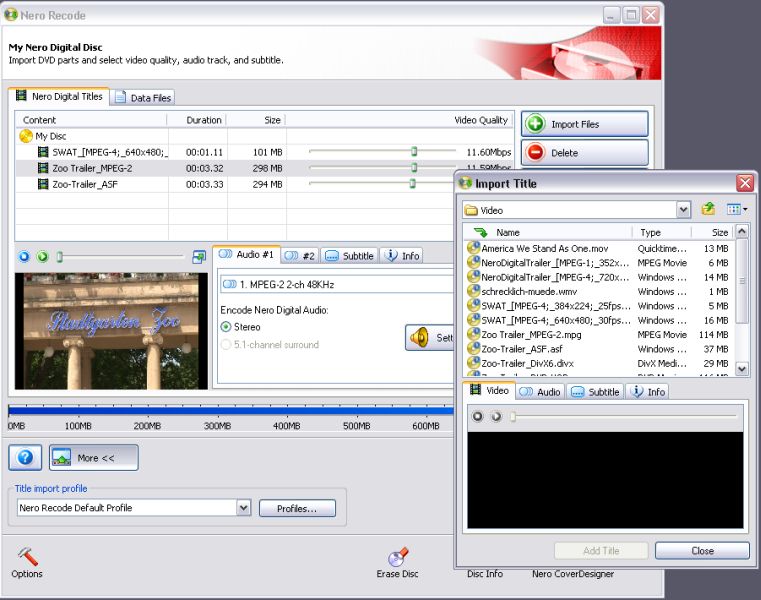
 Adding multiple titles/movies to 1 DVD using Nero Recode 2