

 Home
Home

Page 1 of 1: Using IfoEdit: Setting the 16:9 Flag
The purpose of this guide:
Many standalone DVD recorders on the market today have problems when recording widescreen content that may not be at first apparent. The problem occurs when a true widescreen input (not a letterboxed one) is fed into the DVD recorder, which then records it as if it were 4:3 (fullscreen) content without setting the 16:9 (16x9) flag.
When playing back this recorded DVD on a 4:3 screen that has manual 16:9 switching (allowing to you manually vertically squeeze the picture), everything appears to be fine. But when playing it back on a widescreen monitor with a DVD player that automatically corrects the aspect ratio (eg. adds black bars to the left and right to make the 4:3 content appear correct), then what you get is something that looks like this:
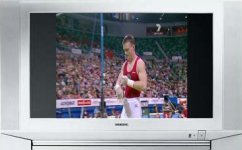
When it should actually look something like this:
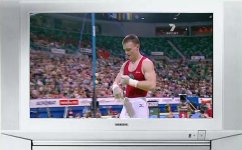
When playing back the DVD on a 4:3 monitor that doesn't have manual 16:9 mode switching, you may get something like this:
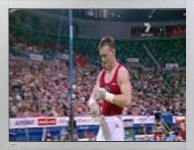
When it should look like this:
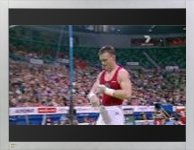
The reason why this is the case is because the recorded DVD's aspect ratio (the ratio of width/height) is set to 4:3 mode, instead of 16:9. Your DVD recorder has actually managed to record the widescreen content in an anamorphic fashion without setting the anamorphic/16:9 flag.
Solutions:
The simplest solution to solve this problem for your widescreen display is to setup your standalone DVD player's "TV Output" setting to "4:3" (either pan-scan or letterbox will do). The problem with this approach, other than the fact that you have to keep on switching between this setting, is that some DVD players (eg. computer based software DVD players like PowerDVD, and certain "big brand" DVD players) either don't have this option or the options doesn't actually work. And if you are making this DVD for a friend or you wish to lend it to others, then it is troublesome to expect them to make the same switch on their DVD players. There are no simple solutions if your TV is 4:3 and it doesn't have manual 16:9 switching (other than to get a new TV set).
The solution outline in this guide is one that will allow you to change the recorded DVD's mode from 4:3 to 16:9, or otherwise referred to as "setting the 16:9 flag". This can be done using a free tool called IfoEdit.
Because you'll be editing files on a DVD, it is recommended that you do the following first:
1. Use a DVD rewritable disc to initially make the recording in your standalone DVD player
2. Finalize the disc
3. Copy the files from the disc to your computer and then proceed to edit these copied files
This guide assumes you have done the above.
Software you'll need:
1. IfoEdit
Instructions:
Many standalone DVD recorders on the market today have problems when recording widescreen content that may not be at first apparent. The problem occurs when a true widescreen input (not a letterboxed one) is fed into the DVD recorder, which then records it as if it were 4:3 (fullscreen) content without setting the 16:9 (16x9) flag.
When playing back this recorded DVD on a 4:3 screen that has manual 16:9 switching (allowing to you manually vertically squeeze the picture), everything appears to be fine. But when playing it back on a widescreen monitor with a DVD player that automatically corrects the aspect ratio (eg. adds black bars to the left and right to make the 4:3 content appear correct), then what you get is something that looks like this:
When it should actually look something like this:
When playing back the DVD on a 4:3 monitor that doesn't have manual 16:9 mode switching, you may get something like this:
When it should look like this:
The reason why this is the case is because the recorded DVD's aspect ratio (the ratio of width/height) is set to 4:3 mode, instead of 16:9. Your DVD recorder has actually managed to record the widescreen content in an anamorphic fashion without setting the anamorphic/16:9 flag.
Solutions:
The simplest solution to solve this problem for your widescreen display is to setup your standalone DVD player's "TV Output" setting to "4:3" (either pan-scan or letterbox will do). The problem with this approach, other than the fact that you have to keep on switching between this setting, is that some DVD players (eg. computer based software DVD players like PowerDVD, and certain "big brand" DVD players) either don't have this option or the options doesn't actually work. And if you are making this DVD for a friend or you wish to lend it to others, then it is troublesome to expect them to make the same switch on their DVD players. There are no simple solutions if your TV is 4:3 and it doesn't have manual 16:9 switching (other than to get a new TV set).
The solution outline in this guide is one that will allow you to change the recorded DVD's mode from 4:3 to 16:9, or otherwise referred to as "setting the 16:9 flag". This can be done using a free tool called IfoEdit.
Because you'll be editing files on a DVD, it is recommended that you do the following first:
1. Use a DVD rewritable disc to initially make the recording in your standalone DVD player
2. Finalize the disc
3. Copy the files from the disc to your computer and then proceed to edit these copied files
This guide assumes you have done the above.
Software you'll need:
1. IfoEdit
Instructions:
- The DVD files you copied from the recorded DVD should look something like this (you may have more or less files than shown in the screenshot):
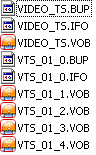
You can try to play back these files within a software DVD player like PowerDVD (in PowerDVD, use the "Open DVD files on hard disk drive" option), and you should immediately see playback aspect ratio problem, and the "Keep Aspect Ratio" option (that normally allows you to set if 16:9 anamorphic content should be displayed normally or vertically stretched) won't work.
There might be several files you need to edit within IfoEdit to set the 16:9 flag. The first file is usually VTS_01_0.IFO (VIDEO_TS.IFO and VIDEO_TS.VOB are the files for the menu, and all the BUP files are BackUP files for all the IFO files). There might also be VTS_02_0.IFO, VTS_03_0.IFO and so on - these indicate more than one title set on your DVD (eg. if you have recorded more than one show/clip using the DVD recorder). You will need to edit each and every title set (IFO file) that has the 16:9 problem, following the instructions below on each of the IFO files/title sets.
- In IfoEdit, click on the "Open" button and open the VTS_01_0.IFO file
- IfoEdit should now display the information for this file. Look for the line shown in the screenshot below (marked in red), notice that it specifies the "4:3" aspect ratio for this title set.
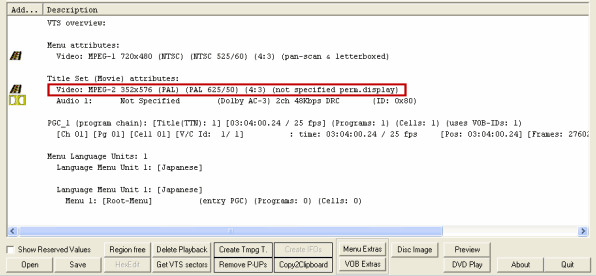
- Double-click on this line to edit it. A new window should open, and it is here that you can select the correct (16:9) aspect ratio for your widescreen DVD. You should also select (check) the "Automatic Pan&Scan" and "Automatic Letterboxed" options. Enabling these options will allow your DVD player to set how this DVD should be played.
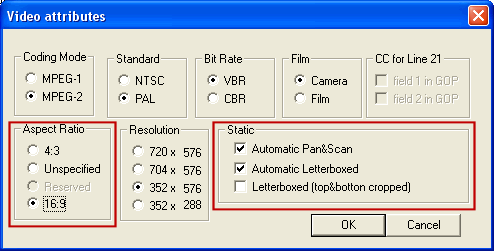
When you have finished editing, press "OK" to close the window.
- Click on the "Save" button to save your edited IFO file, and select "Yes" when IfoEdit asks if you wish to create a BUP (BackUP) file.
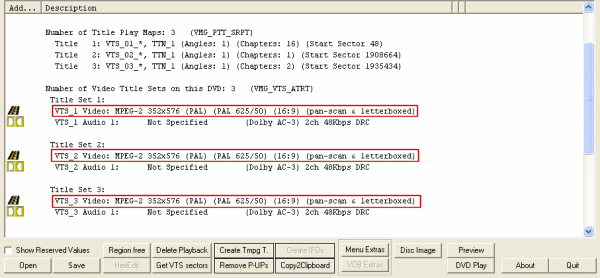
- Now repeat steps 2 thru 5 for each title set you need to modify. When you are finished with these title sets, you will then need to open up VIDEO_TS.IFO, and then repeat the changes for each of the title sets you have modified - it will be fairly obvious where you need to make the changes. For example, the screenshot below shows a DVD with 3 title sets that need to be changed.
- After you have finished editing all your IFO files, you can close IfoEdit and try to play back these files again within a software DVD player like PowerDVD (in PowerDVD, use the "Open DVD files on hard disk drive" option), and you should immediately find that the content plays back at the correct aspect ratio, and that the "Keep Aspect Ratio" option now works properly.
- Now all you need to do is to burn your copied and edited DVD files to a DVD disc, using Nero Burning ROM or a similar DVD-Video burning software. And we're done.
