

 Home
HomePage 2 of 5: Using TMPGEnc DVD Author (TDA) - How to Create/Author a DVD
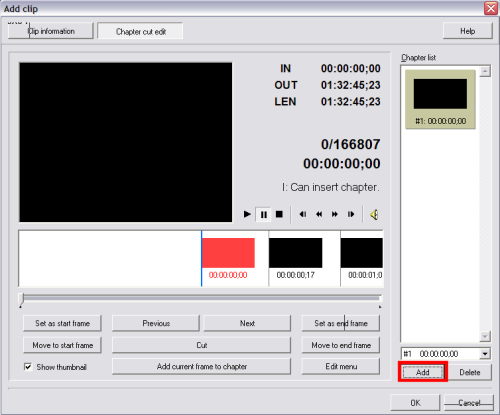
After TDA loads the file you selected, this screen will come up. There are 2 buttons at the top. Go ahead and click the "Chapter cut edit" button (red). (Screen Shot Below)

Now this screen will pop up, here you will be able to create "chapters" so that you may conveniently skip to a scene of your preference. Go ahead and click the "Add" button.
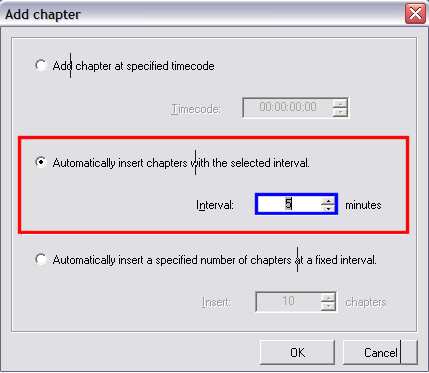
After clicking the "Add" button, this screen will pop up. It gives you 3 options to choose from.
Now this screen will pop up, here you will be able to create "chapters" so that you may conveniently skip to a scene of your preference. Go ahead and click the "Add" button.
After clicking the "Add" button, this screen will pop up. It gives you 3 options to choose from.
- Add chapter at specified timecode ( ie. 1st chapter at 45 seconds, 2nd chapter at 5 minutes, etc.)
- Automatically create chapters at selected time intervals ( ie. Every 15 Minutes)
- Automatically insert specified number of chapters at fixed intervals ( ie. total number of chapters you want and let TDA decide where)


