

 Home
Home

Page 1 of 5: Using TMPGEnc DVD Author (TDA) - How to Create/Author a DVD
Below I will show you how to author/create a DVD using TMPGEnc DVD Author (TDA) that will play in any DVD player. It will have all of the necessary files (.bup, .ifo, and .vob files) needed for your DVD player to play it.
NOTE 1: New versions of this guide for TDA 3.0 has been released, both for DVD Authoring and the new DivX Authoring functionality.
NOTE 2: a printer-friendly zipped .pdf document of this guide can be found here
Credit photo angel2004
Software you will need:
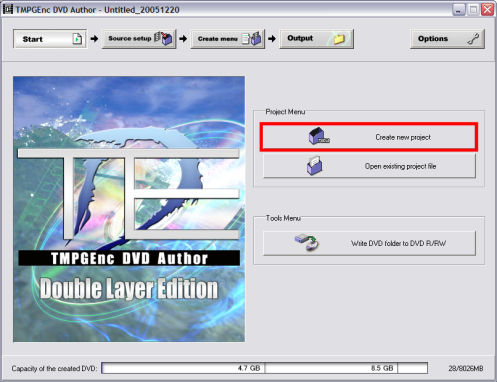
Start up TDA, on the main screen click the "Create new project" button (red). (Screen Shot Below)
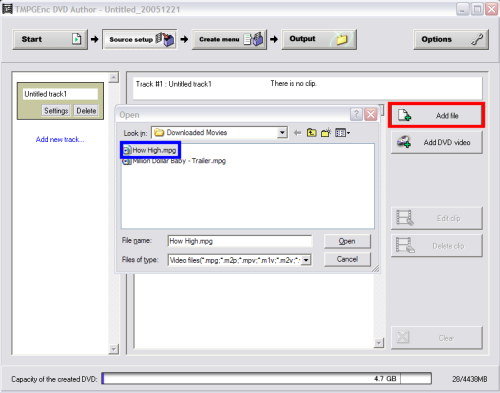
After clicking "Create new project" button, this screen will come up. Go ahead and click the "Add File" button (red), then load the MPEG-2 file you have or the one you made with TMPGEnc in this guide) (blue). (Screen Shot Below)
NOTE 1: New versions of this guide for TDA 3.0 has been released, both for DVD Authoring and the new DivX Authoring functionality.
NOTE 2: a printer-friendly zipped .pdf document of this guide can be found here
Credit photo angel2004
Software you will need:
Start up TDA, on the main screen click the "Create new project" button (red). (Screen Shot Below)
After clicking "Create new project" button, this screen will come up. Go ahead and click the "Add File" button (red), then load the MPEG-2 file you have or the one you made with TMPGEnc in this guide) (blue). (Screen Shot Below)

