

 Home
HomePage 2 of 5: Using Nero Burning ROM 6.x - Burning a DVD
6. Now, I am going to take a screen shot of each one of my tabs just to show you what I have with a check mark in it, etc. I am going to skip the first tab, cause its just a info tab, as it will show different info for everyone. (Screen Shot Below)
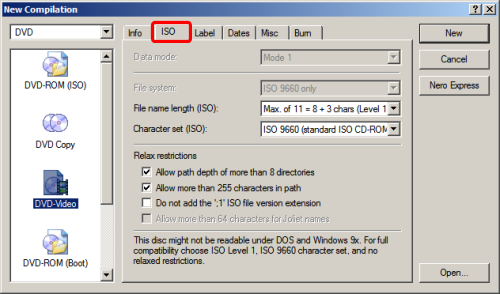
(a) "ISO" tab: Screen Shot Below:
The options under "Relax restrictions" can be unselected, because if the DVD files you are burning has been formatted properly (and it should have been), then it won't break these restrictions anyway.
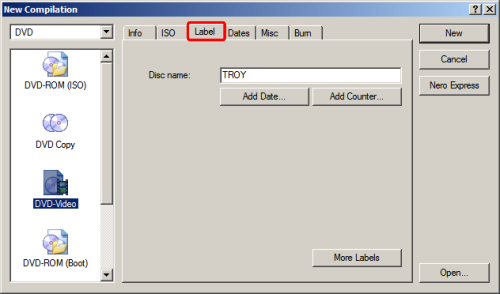
(b) "Label" tab: This is where you would put the movie title. (In some earlier versions of Nero, it does not accept spaces in the words so you have to use the underscore ( _ ) character instead. You can use the "Add Date" and "Add Counter" buttons to add formatted dates/counters, but it's more of a cosmetic thing. (Screen Shot Below)
(c) "Dates" tab: You almost never have to deal with the settings here, especially for a DVD video disc. You can just leave this one alone and go to the next tab.
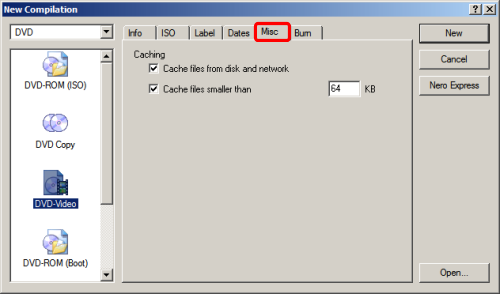
(d) "Misc" tab: These options are burning performance options (or rather, options to prevent buffer overruns and things like that). The default settings seems to be fine, and most DVD burners have overrun protection these days already. (Screen Shot Below)
(e) "Burn" tab: "Determine maximum speed" and "Simulation" are usually not required, unless you are using a particular drive/media for the first time and you are unsure about the write speed. If you have a blank media already inserted into your drive, then the "Write Speed" should list the maximum write speed of the media. Sometimes the listed speed is actually higher than the rated speed (the speed listed on the media/media packaging), and while you can select and burn the disc above the rated speed, it is not recommended (you might get read errors when accessing the burned disc). In general, burn at the rated speed or lower if you have time.
There are also some other options like if you wish to burn more than one copy, or to run a virus check before burning (not too many DVD Video viruses though). (Screen Shot Below)

(a) "ISO" tab: Screen Shot Below:
The options under "Relax restrictions" can be unselected, because if the DVD files you are burning has been formatted properly (and it should have been), then it won't break these restrictions anyway.
(b) "Label" tab: This is where you would put the movie title. (In some earlier versions of Nero, it does not accept spaces in the words so you have to use the underscore ( _ ) character instead. You can use the "Add Date" and "Add Counter" buttons to add formatted dates/counters, but it's more of a cosmetic thing. (Screen Shot Below)
(c) "Dates" tab: You almost never have to deal with the settings here, especially for a DVD video disc. You can just leave this one alone and go to the next tab.
(d) "Misc" tab: These options are burning performance options (or rather, options to prevent buffer overruns and things like that). The default settings seems to be fine, and most DVD burners have overrun protection these days already. (Screen Shot Below)
(e) "Burn" tab: "Determine maximum speed" and "Simulation" are usually not required, unless you are using a particular drive/media for the first time and you are unsure about the write speed. If you have a blank media already inserted into your drive, then the "Write Speed" should list the maximum write speed of the media. Sometimes the listed speed is actually higher than the rated speed (the speed listed on the media/media packaging), and while you can select and burn the disc above the rated speed, it is not recommended (you might get read errors when accessing the burned disc). In general, burn at the rated speed or lower if you have time.
There are also some other options like if you wish to burn more than one copy, or to run a virus check before burning (not too many DVD Video viruses though). (Screen Shot Below)


