

 Home
HomePage 4 of 5: Using Nero Burning ROM 6.x - Burning a DVD
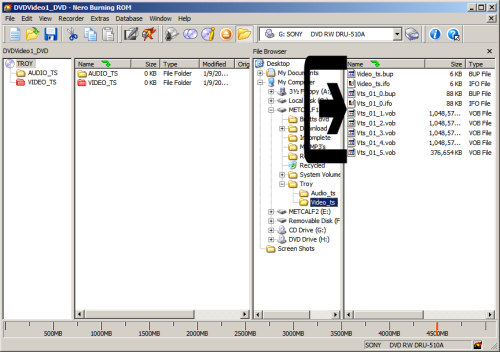
11. Now click the "Video_ts" folder, and in the sub window to the right of the "File Browser" sub window, the DVD files should appear. (Either a bunch of .vob, .bup, .ifo files or a single .iso file .) (Screen Shot Below)
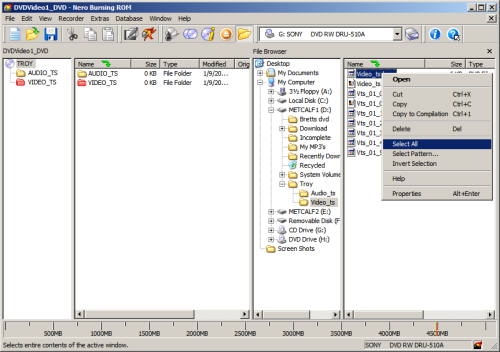
12. Now, right click the first file that is listed, and left click "Select All". (They should all be highlighted after you left click "Select All") (Screen Shot Below)
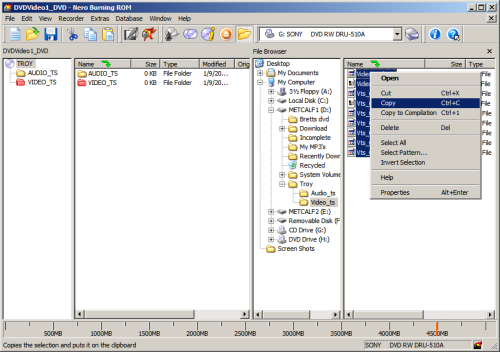
13. Now, right click again "ON" the highlighted files, and left click on "Copy". You HAVE to right click on the highlighted files, other wise it will deselect them. (Screen Shot Below)
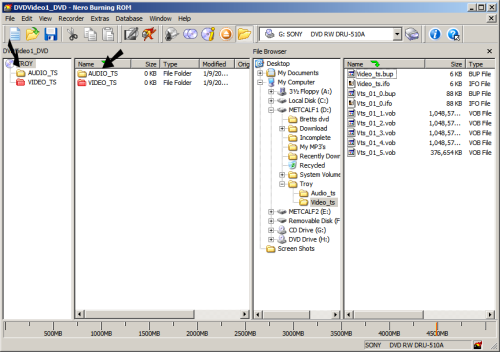
14. Now, on the left hand side of the Nero screen, there should be a "AUDIO_TS" & "VIDEO_TS" folder.(There will be 2 different sets of them) (Screen Shot Below)
12. Now, right click the first file that is listed, and left click "Select All". (They should all be highlighted after you left click "Select All") (Screen Shot Below)
13. Now, right click again "ON" the highlighted files, and left click on "Copy". You HAVE to right click on the highlighted files, other wise it will deselect them. (Screen Shot Below)
14. Now, on the left hand side of the Nero screen, there should be a "AUDIO_TS" & "VIDEO_TS" folder.(There will be 2 different sets of them) (Screen Shot Below)


